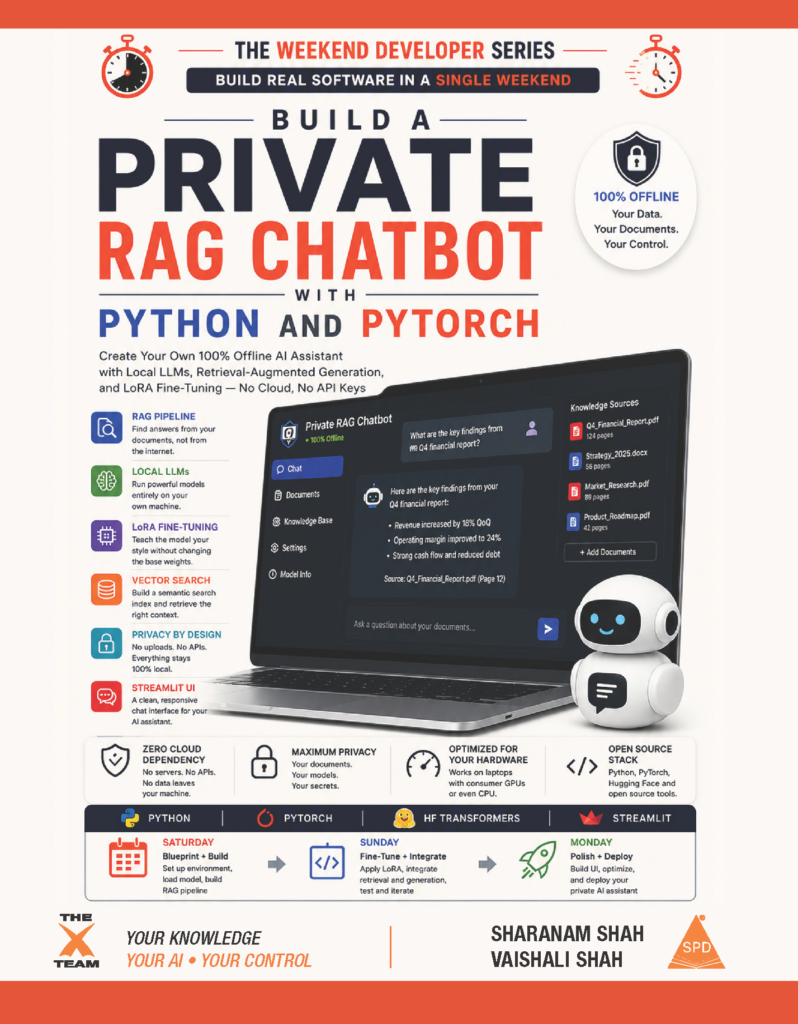
Create Your Own 100% Offline AI Assistant with Local LLMs, Retrieval-Augmented Generation, and LoRA Fine-Tuning — No Cloud, No API Keys
The model does not know your documents. It never did.
Every time you paste a sensitive report, a legal contract, or a research PDF into a hosted AI chat window, that document leaves your machine. It travels to a server you do not control, gets processed by a company whose data retention policy you have probably never read, and generates an answer from general training data — not from the specific file you uploaded. When the answer is wrong, you have no idea why. When it is right, you have no idea which part of your document it actually read. And every question you asked, every document you uploaded, every response you received, was processed on infrastructure owned by someone else.
There is a better architecture. It has been quietly maturing for the past two years, and it does not require a data center, a GPU cluster, or a cloud subscription. It runs on the laptop you already own. It answers exclusively from your documents and nothing else. It never transmits a single byte to the internet after the initial model download. And it can be taught to sound exactly like you.
This book teaches you to build it. From scratch. In a single weekend.
What Is RAG Forge Desk?
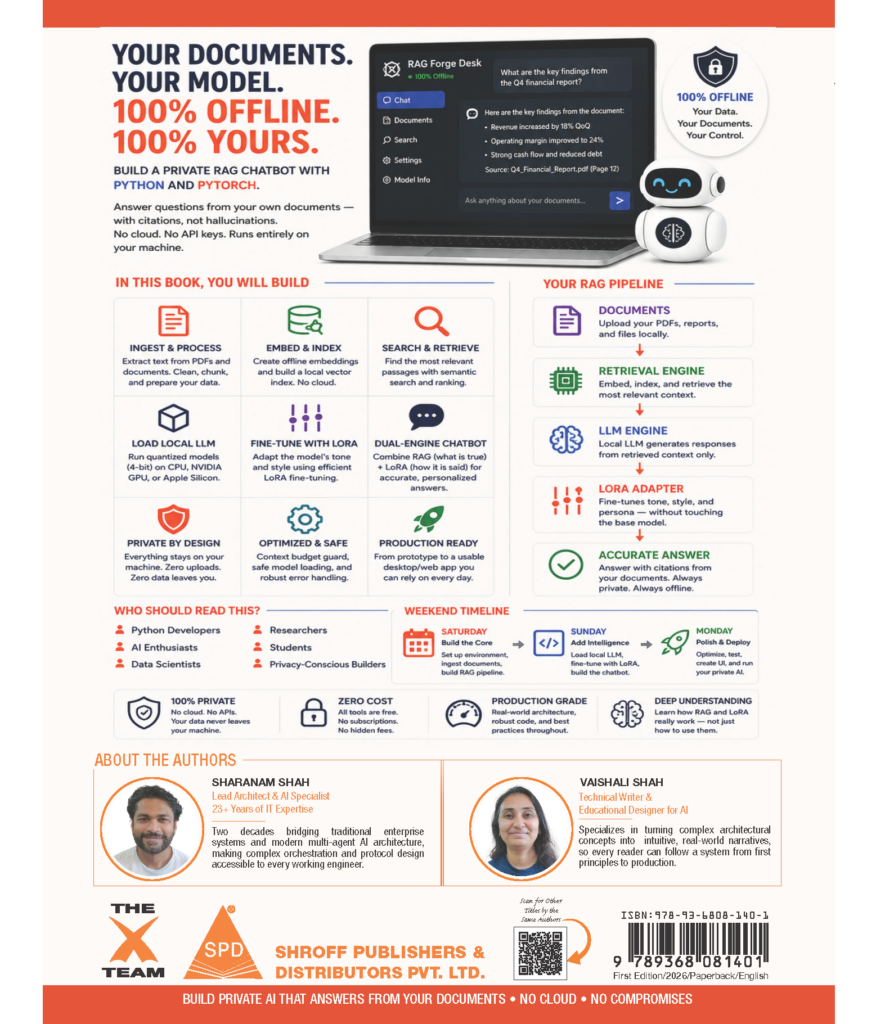
RAG Forge Desk is the application you will build across this book: a 100% offline, privacy-first AI workspace that combines two completely independent engines into one seamless interface.
Engine 1: Retrieval-Augmented Generation (RAG) handles facts. Think of it as an open-book exam — the model is never expected to memorize your PDF. At question time, a semantic search algorithm finds the exact relevant passages from your uploaded document and hands them to the model, tagged with the page number they came from. The model answers from that context and nothing else, and says so plainly when the answer is not in the document. This is what prevents hallucination.
Engine 2: LoRA Fine-Tuning handles tone. If RAG is the open-book exam, LoRA is the vocal coach standing beside the student — changing nothing about what they know and everything about how they say it. Low-Rank Adaptation trains a small set of adapter weight matrices, a few megabytes at most, that nudge the model’s phrasing toward a target voice: formal and compliance-driven, or relaxed startup-speak, or whatever short writing sample you feed it. The base model’s original knowledge stays completely untouched underneath.
The core insight this book is built around: RAG answers what is true, according to your documents. LoRA answers how that truth should be phrased. Chapter 8 is where they finally meet in a single response — a dual-engine answer that is both factually grounded and voiced the way you want it.
And the entire stack — the embedding model, the language model, the vector index, the fine-tuning adapter — runs on hardware you already own, with the Wi-Fi off.
A Note on Chapter 0
This book contains an optional Chapter 0: Before the Flight Plan — The Concepts Behind the Build.
If you have already fine-tuned a model, built a RAG pipeline, or can explain the difference between fp16 and int4 quantization without pausing, skip Chapter 0 entirely. Start with Chapter 1, where the Product Requirements Document lives. You have already paid the tuition Chapter 0 charges.
Chapter 0 earns its place for a different reader: someone who has written Python, maybe even shipped a web application, but has never opened the hood on a language model. Someone who has heard the words vector database, quantized, fine-tuned, and context window in the same sentence at work and nodded along without a clear picture of what any of them mean. If any part of the local AI landscape felt like a locked door before you opened this book, Chapter 0 is the key. Read it once, and every chapter from Chapter 1 onward stops sounding like a foreign language and starts sounding like an engineering specification.
A two-minute self-check at the start of Chapter 0 tells you in thirty seconds whether you need it.
Who This Book Is For
Legal, compliance, healthcare, and finance professionals who are barred — by contract, regulation, or plain common sense — from uploading sensitive documents to a public AI interface. RAG Forge Desk was built for exactly this constraint. Your documents never leave your machine at any point after model weights are downloaded. That is not a marketing claim. It is a testable requirement with explicit Wi-Fi-off verification steps in Chapter 5 and Chapter 8.
Self-taught developers and weekend engineers who want to understand how RAG and fine-tuning actually work, not just call them through a third-party SDK. This book does not wrap an API and call it local AI. Every moving part — the chunker, the embedding engine, the vector search, the quantized model loader, the LoRA adapter, the context-window budget guard — is built by hand, explained before it is written, and tested against a known-good golden asset.
Data scientists and ML practitioners moving from cloud-based notebook experiments to a fully local, hardware-aware inference pipeline. If you have run Hugging Face models in Colab and want to understand what a production-style local deployment actually looks like — hardware detection, graceful degradation, memory lifecycle management, batched embedding pipelines — this book maps that entire path.
Engineering students who want to see PyTorch, Hugging Face transformers, peft, sentence-transformers, and Streamlit used together in a real application, not isolated tutorial notebooks that work in a controlled environment and break the moment a real file is uploaded.
Anyone who is tired of AI answers they cannot trace back to a specific source in their own document.
You do not need a machine learning background. You do not need a computer science degree. You need basic Python logic, the ability to write a function, and the ability to open a terminal.
The Hardware Reality This Book Takes Seriously
Most local AI tutorials gloss over hardware. This one does not, because the single most common reason a developer’s Saturday session ends in frustration is a hardware assumption that was never stated explicitly.
RAG Forge Desk’s model loader detects its hardware backend at runtime and branches its strategy accordingly. This is not an edge case handled with a try/except. It is a first-class requirement, formalized in the PRD and implemented in Chapter 6:
- NVIDIA CUDA GPU → 4-bit quantization via bitsandbytes, compute dtype float16, double quantization enabled. The most memory-efficient path — a TinyLlama 1.1B model runs at roughly 1 to 1.5 GB of GPU RAM.
- Apple Silicon (MPS) → fp16 fallback, bitsandbytes skipped entirely. This is not a workaround: bitsandbytes has no functional Apple Silicon support, and the correct engineering response is to skip it cleanly, not force it.
- CPU-only → Same fp16 fallback as MPS. Inference is noticeably slower but fully functional. TinyLlama 1.1B is the recommended model for this path.
Three supported model choices are built into the dropdown: TinyLlama-1.1B (the safe default for any hardware), Qwen2.5-1.5B (a strong mid-range choice), and Microsoft Phi-4-mini at 3.8B (CUDA-recommended, heavy on an 8GB laptop). The Chapter 1 PRD includes a memory footprint planning table so you choose a model that fits your RAM before you click Load Model and find out the hard way mid-download.
The Golden Assets
Development against random internet documents is how bugs hide in plain sight. RAG Forge Desk solves this the way any serious engineering team would: with a controlled set of golden assets that every worked example, every test case, and every expected answer in the book is written against.
Apollo Space Mission Protocol.pdf — The required RAG knowledge base for every worked example: structured safety data covering oxygen thresholds, atmospheric pressures, and mission protocols. The ingestion pipeline is fully generic and will accept any PDF you upload. Apollo is the document every test case assumes is loaded, which is why it ships with the book.
Corporate Stylistic Blueprint.txt — The primary fine-tuning tone asset: dense, ultra-formal, high-compliance corporate-consultant prose. Upload it in the Fine-Tuning Studio tab and the model learns to answer in that register. If you upload nothing, llm.py falls back to an identical built-in constant, so the fine-tuning chapter never breaks on a missing file.
Casual Startup Voice.txt — A contrasting tone sample: relaxed, informal, deliberately opposite to the corporate blueprint. Its only purpose is pedagogical. Fine-tuning once on each lets you literally hear the model’s voice flip between two runs in Chapter 7 — the single clearest proof that the LoRA pipeline is doing real work and not producing cosmetic noise.
The Ten-Chapter Build
Chapter 0 — Before the Flight Plan (Optional) Tokens, embeddings, attention mechanisms, quantization, RAG, and LoRA — every concept the book uses explained in plain English, without a single line of linear algebra. Skip this if you already know the stack. Read it if any of these terms felt unclear before you picked up this book.
Chapter 1 — Define the Product Requirements The PRD that every architectural decision in this book traces back to: the one-sentence offline contract, two named personas, the dual-engine strategy explained before either engine has code attached to it, the hardware execution matrix, the golden assets, ten functional requirements, and five non-functional requirements, including the absolute data privacy mandate.
Chapter 2 — Set Up the Development Environment A seven-phase installation covering foundational tools, project directory initialization, golden asset creation, virtual environment isolation, PyTorch suite installation (hardware-branched), application dependencies, and the three-file project scaffold: app.py owns the interface, rag.py owns retrieval, llm.py owns generation and training.
Chapter 3 — Build the Application Interface The complete Streamlit command-center dashboard: orientation panel with the self-guided how-this-works collapse, model dropdown sidebar, four workspace tabs (Knowledge Base, Fine-Tuning Studio, Chat, System Info), custom footer, and the session-state manager that persists model and retrieval state across Streamlit’s reactive re-runs.
Chapter 4 — Ingest the Golden Dataset A page-aware PDF extractor that tags every text chunk with its source page number, wired to a sentence-aware chunker that respects semantic boundaries rather than splitting on arbitrary character counts. Validated against the Apollo golden asset with explicit output verification steps.
Chapter 5 — Embed and Search the Knowledge Base The offline semantic embedding engine using sentence-transformers with a disk-cached model download, a batched embedding pipeline that reports progress without freezing the UI on large PDFs, and a cosine-similarity search algorithm that returns passages tagged with page citations. Wi-Fi-off verification included.
Chapter 6 — Load the Local LLM The hardware-aware model loader that detects CUDA, MPS, and CPU at runtime and branches accordingly, maps the sidebar dropdown to Hugging Face model identifiers, implements safe model reloading that clears the previous model from memory before loading a new one, and records the active hardware strategy for the UI status caption.
Chapter 7 — Fine-Tune the Offline Model The LoRA wrapper configuration (rank, alpha, target modules), the PyTorch training loop with live loss-curve telemetry rendered inside Streamlit during training, the uploadable tone asset input with a safe built-in fallback, and the Reset to Base Model control that discards a fine-tuned adapter and reloads original weights without restarting the application.
Chapter 8 — Build the Dual-Engine Chatbot Autoregressive generation wrappers, decoding parameter configuration with safe defaults, the context-window budget guard that measures retrieved RAG context in tokens and trims before generation so no model silently truncates, the prompt injection template that wires context and question into a single formatted input, and the final UI wiring that produces a dual-engine response with page citations from the complete pipeline. Master validation suite with Wi-Fi off.
Chapter 9 — Under the Hood The PyTorch cross-entropy loss and gradient descent mathematics behind the LoRA training loop, the multi-dimensional vector geometry behind cosine similarity search, the quantization theory explaining why a model’s file size is not the same number as the RAM it needs, the trust-by-design argument for why page citations are a functional requirement and not cosmetic polish, and the developer roadmap pointing toward ChromaDB, multi-document indexing, and enterprise production deployment.
What Makes This Book Different From Every Other Local AI Tutorial
No notebook experiments. Every line of code goes into a real Python module — app.py, rag.py, or llm.py — that is part of the finished application. Nothing is throwaway.
No cloud shortcuts. There is no Hugging Face Inference API call disguised as local AI. Every embedding, every generation, every fine-tuning step runs on your own hardware.
Every hardware failure mode is documented. The Common Pitfalls section in each chapter is not a generic list of beginner mistakes. It is built from the exact failure modes that appear when bitsandbytes hits an Apple Silicon machine, when a RAG pipeline retrieves the right passage but overflows the context window, when a LoRA training loop converges to a perfect loss curve but produces no measurable tone change because the adapter rank was misconfigured.
The PRD comes first. Chapter 1 is not a formality. Every functional requirement traces directly to a line of code in a later chapter. Skip it and you are building without a flight plan. Read it and every chapter from Chapter 2 onward has a clear target to aim at.
The architecture is honest about its own limits. The memory footprint planning table tells you which model fits your RAM before you start downloading. The hardware execution matrix tells you exactly what bitsandbytes will and will not do on your specific silicon. No feature is described as working on hardware it does not work on.
The Technical Skills You Will Own
By Chapter 9, these will be second nature:
- Dual-engine RAG + LoRA architecture — the conceptual and implementation-level difference between retrieval for facts and fine-tuning for tone, explained once and never confused again
- Hardware-aware model loading — CUDA 4-bit quantization, Apple Silicon fp16 fallback, and graceful CPU degradation, detected and branched at runtime
- Offline semantic search with page citations — a complete embedding-and-retrieval pipeline that produces auditable, source-cited answers from a local PDF, with zero network calls at inference time
- LoRA adapter configuration — rank, alpha, target modules, and the training loop parameters that determine whether fine-tuning produces real tone change or cosmetic noise
- Context-window budget management — token-counting retrieved context against a model’s real limit and trimming intelligently before generation
- Live training telemetry — a loss-curve chart that updates inside Streamlit in real time during a fine-tuning run, so you can see convergence without leaving the application
- Trust-by-design UX — page citations, numbered step indicators, and hardware strategy status captions as functional requirements backed by acceptance criteria, not design afterthoughts
- PyTorch optimization mathematics — the cross-entropy loss, backpropagation, and gradient descent mechanics behind every adapter weight update your fine-tuning loop performs
Your Toolkit — 100% Free and Open Source
Every tool in this book is free, open-source, and identical to what professional ML engineering teams use daily.
- Python 3.14+ — the language the entire local AI ecosystem runs on
- Visual Studio Code — your cockpit, with split terminal panels for the dashboard and training monitoring
- Streamlit — the framework that turns three Python modules into a self-guided, stateful AI workspace
- PyTorch — the tensor engine underneath model loading, LoRA training, and autoregressive text generation
- Hugging Face transformers, peft, accelerate — model and tokenizer loading, the LoRA implementation, and device placement
- bitsandbytes — 4-bit quantization on CUDA, skipped cleanly on Apple Silicon and CPU
- sentence-transformers — the offline embedding engine behind semantic search, with no cloud dependency at inference time
- pypdf — the PDF extraction engine behind the page-aware chunking pipeline
The Complete Companion Code
The complete codebase — every Python module, every golden asset, every environment manifest — is ready to download, run, break, and rebuild.
Book Four in The Weekend Developer Series
This is the fourth title in The Weekend Developer Series — execution-first build guides for impossibly busy people, engineered around one promise: start Saturday morning and ship something real by Sunday night.
The first title, Build a GenAI Desktop Assistant Using Streamlit, took you from a blank file to a deployed cloud AI assistant. The second, Build a Secure PDF Toolkit Using Python and Streamlit, built a fully offline document operations center. The third, Build a DevOps Monitoring Dashboard with Python and Streamlit, turned a developer’s own machine into a self-hosted operations center. This book goes further than all of them: it teaches you to build AI that reasons from your own documents, in a tone you trained it on, on hardware you already own, with the router unplugged.